

Wix is the builder photographers land on when they want to start for nothing and figure it out later. That is a genuinely reasonable plan — but there is one number on the pricing page that catches almost everybody, and it is worth knowing before you spend a weekend building.
We build photography websites for a living, including rebuilds for people who have outgrown Wix and people who should stay on it. Here is what it does well, where it bites, and how it compares with Squarespace.
Plans and prices checked August 2026. Wix changes both regularly — confirm on their site before committing.
The storage number everyone misreads
| Plan | Price / month | Storage | Galleries you could hold* | Can sell |
|---|---|---|---|---|
| Free | $0 | Limited, Wix branding | — | No |
| Light | $19.77 | 2 GB | ~590 exported properly, ~22 straight from Lightroom | No |
| Core | $29.77 | 50 GB | Comfortable for a working photographer | Yes |
| Business | $39.77 | 100 GB | More than most will use | Yes |
| Business Elite | $159.77 | Unlimited | Unlimited | Yes |
*Based on a 40-image gallery. At 1600 px / quality 75 that is about 3.4 MB; straight out of Lightroom at 4000 px / quality 95 it is about 94 MB. Prices checked August 2026.

Start here, because it decides everything else. Wix’s plans currently run:
- Free — $0, with Wix branding on the site
- Light — around $19.77/month, 2 GB storage
- Core — around $29.77/month, 50 GB, and the first tier that lets you sell
- Business — around $39.77/month, 100 GB
- Business Elite — around $159.77/month, unlimited storage
Two gigabytes on the Light plan sounds alarming, and whether it actually is depends entirely on how you export. We measured a real photograph at the sizes we recommend, then did the arithmetic on a forty-image gallery:
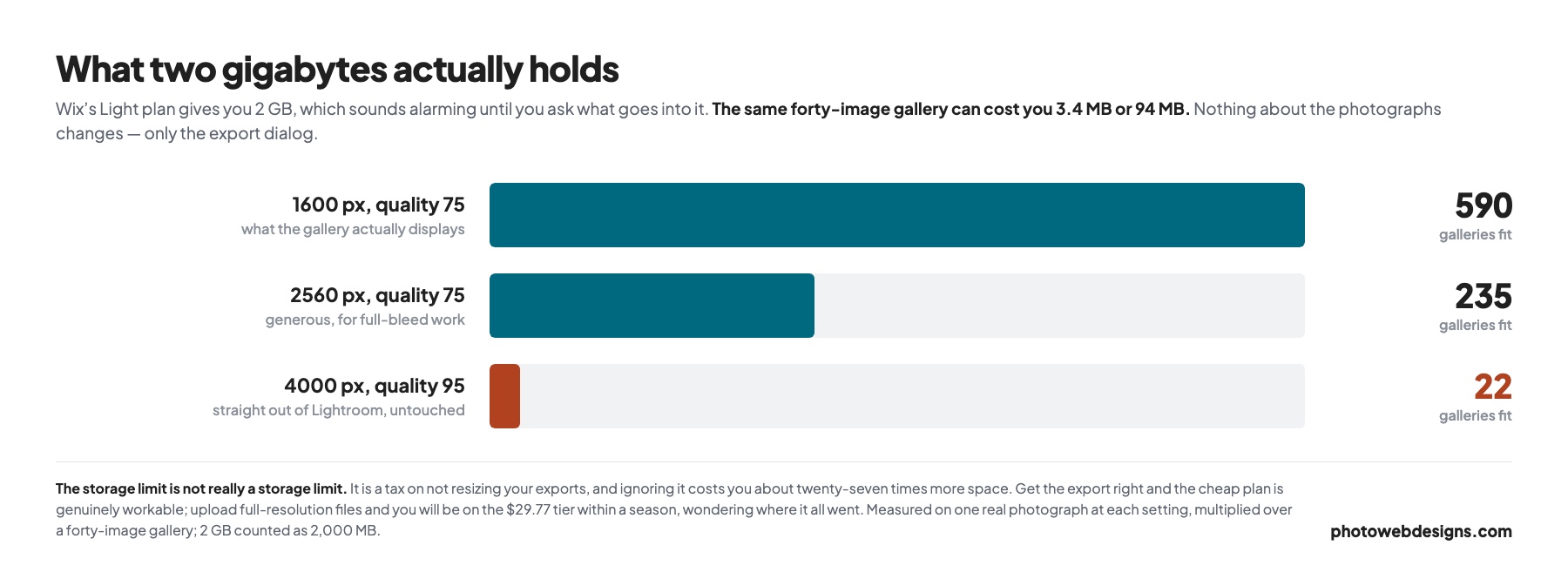
- Exported at 1600 px, quality 75 — about 3.4 MB per gallery. Two gigabytes holds roughly 590 galleries.
- Exported at 2560 px — about 8.7 MB per gallery, or roughly 235 galleries.
- Uploaded straight from Lightroom at 4000 px, quality 95 — about 94 MB per gallery. Two gigabytes holds 22.
So the storage limit is not really a storage limit. It is a tax on not resizing your exports, and it costs you roughly twenty-seven times more space to ignore. Get the export settings right and Light is genuinely workable; upload full-resolution files and you will be on Core within a season, wondering where it went.
Most photographers do upload full-resolution files, which is why Core at around $30 is the tier people actually end up on. Whether that is Wix’s fault or ours is a fair question — the fix is in how to speed up a photography website, and it makes your site faster as a side effect.
Who it suits — and who it does not
It suits you if you want to test whether you need a website at all before paying, you have some design instinct and want to place things exactly where you want them, or you want galleries, a shop and a booking system without assembling three subscriptions.
It suits you less if you want a site that looks designed rather than assembled, you are competing on search in a serious market, or you have a large archive and do not want to think about storage tiers.
The editor
Wix gives you genuine drag-and-drop: elements go where you drop them, down to the pixel. Compared with Squarespace’s grid, that is either liberating or dangerous depending on your eye.
The honest trade-off is that freedom makes it easy to build something that looks slightly off — misaligned by a few pixels, inconsistent spacing between sections, a mobile layout that needs separate attention because the desktop one was positioned by hand. Squarespace stops you doing that. Wix trusts you not to.
One practical gripe reported consistently by photographers: media uploads are slow. Pushing a large batch of images through the editor takes noticeably longer than on competing platforms, which is a real irritation when you are publishing a new gallery on a deadline.
Galleries and image handling
This is Wix’s strongest suit for photographers, and it is genuinely good.
- Multiple gallery types — grid, masonry, slideshow, full-screen and lightbox layouts, all configurable without touching code.
- Wix Photo Studio for basic adjustment and optimisation inside the platform.
- Automatic responsive delivery, so a phone is not sent a desktop-sized file.
As with any platform, automatic optimisation does not rescue a careless export. Getting the sizes right before upload still matters — see how to speed up a photography website for the settings.
Templates
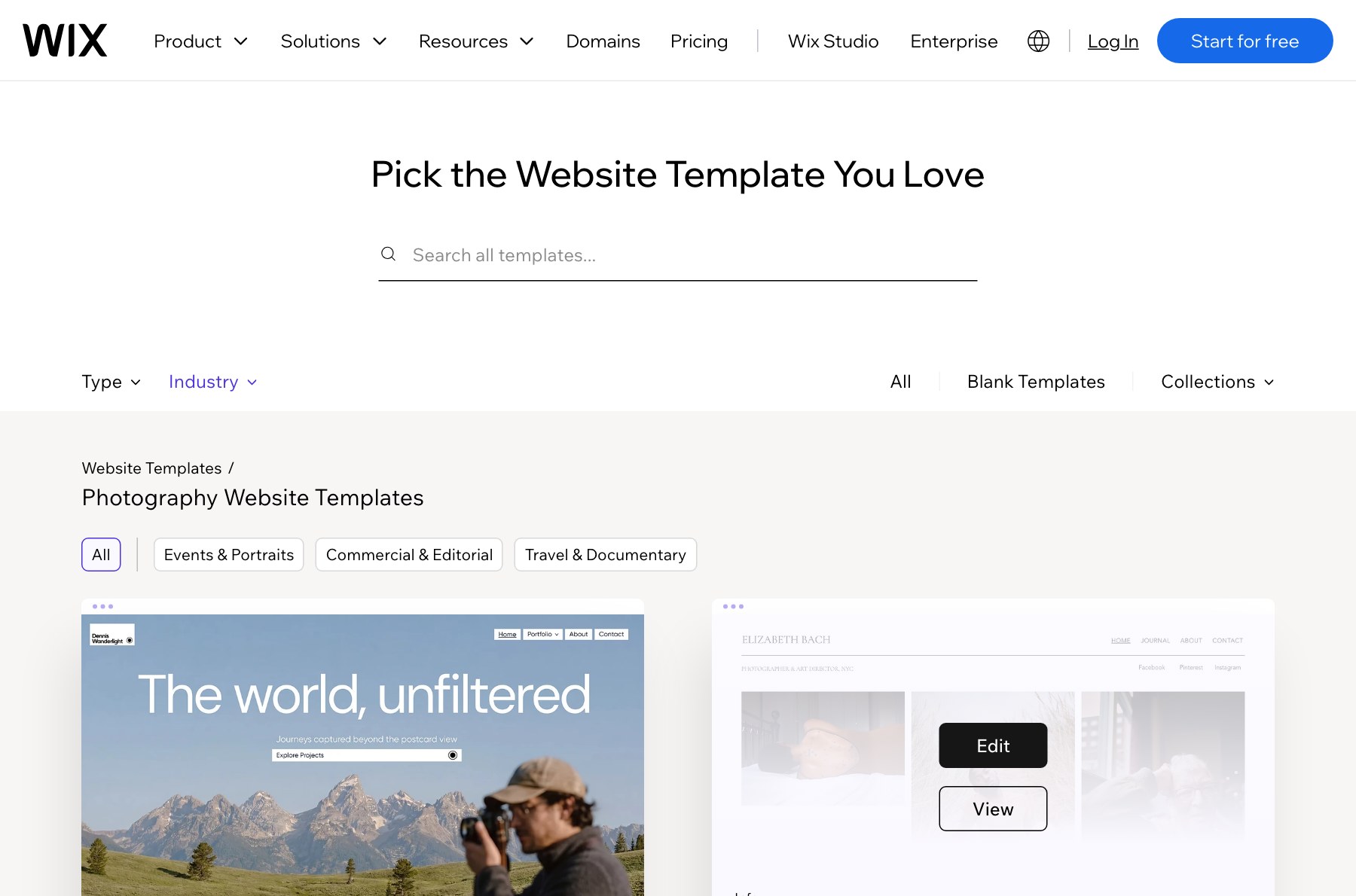
Wix has far more templates than Squarespace, including a large photography category. The catch is the hit rate: there are more to choose from, and proportionally fewer that look genuinely current.
There is also a constraint people discover late: you cannot change template after you publish without rebuilding. On Squarespace you can restyle heavily within one system; on Wix, picking the wrong starting point is a more expensive mistake. Spend longer choosing than feels necessary.
Selling prints and downloads
Selling requires the Core plan or above. Once you are there you get a proper store — physical prints, digital downloads, and payment handling built in, alongside booking for sessions.
The gap, as with Squarespace, is print fulfilment. There is no photo lab wired in, so a framed print means fulfilling it yourself or bolting on a third party. If print revenue is central, a platform built around a lab will serve you better — we cover those in our Zenfolio alternatives rundown.
SEO
Wix’s SEO has improved a great deal and the old “Wix is bad for SEO” line is out of date. Titles, descriptions, alt text, sitemaps, redirects and structured data are all editable, and the SEO Setup Checklist is a genuinely helpful onboarding tool for people who have never done any of it.
Where it still lags is page speed. Wix sites carry more front-end weight than equivalent Squarespace or static builds, and on an image-heavy portfolio that shows up in Largest Contentful Paint. It will not stop you ranking for your name and your city. It is a handicap in a genuinely competitive market.
Wix vs Squarespace for photographers
The comparison most photographers are actually making.
- Free tier: Wix has one, Squarespace does not. If you want to try before paying, that settles it.
- Design: Squarespace looks better untouched. Wix goes further if you push it, and worse if you do not.
- Layout control: Wix is genuinely free-form. Squarespace keeps you on a grid.
- Features: Wix has the bigger app ecosystem — booking, stores, memberships.
- Speed: Squarespace is generally lighter, which matters on galleries.
- Switching templates: Squarespace lets you restyle; Wix effectively does not.
A workable rule: if you have design instincts, Wix will frustrate you less. If you do not, Squarespace will protect you from yourself. There is more detail in our Squarespace review for photographers.
Verdict
✓ Pros — what Wix does well
- A genuinely free tier — the least risky way to find out if a website earns its keep
- The widest range of gallery types of any mainstream builder
- True pixel-level drag and drop, if you have the eye for it
- Galleries, store and booking in one subscription
- Wix Photo Studio for adjustment inside the platform
- SEO controls are complete — the old “bad for SEO” reputation is out of date
✗ Cons — where it frustrates photographers
- 2 GB on the Light plan is unforgiving if you upload full-resolution files
- Selling requires Core, so the real entry price is nearer $30 than $20
- You cannot change template after publishing without rebuilding
- Media uploads are noticeably slow in the editor
- Heavier front-end than Squarespace, which shows up in LCP on galleries
- Free-form layout makes it easy to build something that looks slightly off
Our verdict: Wix
- Galleries & images 9/10
- Design quality 7/10
- Ease of use 7/10
- SEO control 7/10
- Client proofing 4/10
- Selling prints 7/10
- Value 8/10
The best choice if you want one subscription covering galleries, selling and bookings — and the only one here you can try for nothing. It scores below Squarespace on design and above it on flexibility and value. Go in knowing the template choice is close to permanent and the entry tier is tighter than it looks.
Wix is a strong choice for photographers who want one subscription to cover galleries, selling and bookings, and who are comfortable making design decisions themselves. The free tier makes it the least risky way to find out whether a website earns its keep for you.
Go in knowing two things. The advertised entry price is not the one you will pay — 2 GB does not hold a photographer’s work, so plan for Core. And the template you pick is close to permanent, so choose it slowly.
It becomes the wrong tool at the same point Squarespace does: when the site stops being a portfolio and becomes a marketing channel you are actively competing with. At that point the weight and the template ceiling start costing more than the convenience saves.
Common questions
Is Wix good for photographers?
Yes, particularly for photographers who want galleries, a store and booking in one place and are happy to make their own design decisions. Its gallery types are among the best of any mainstream builder. Its weaknesses are page weight and the tiny storage on the entry plan.
Is the free Wix plan enough for a photography portfolio?
For testing, yes. For a working business, no — it carries Wix branding and you cannot use your own domain properly, which undermines the professionalism the site exists to convey.
How much storage do I actually need?
Less than you think, if you export properly. At 1600 px and quality 75 a forty-image gallery is about 3.4 MB, so even 2 GB holds hundreds. Upload straight from Lightroom at full resolution and the same gallery is 94 MB, at which point 2 GB holds about twenty-two.
Can I change my Wix template later?
Not without rebuilding. Unlike Squarespace, Wix does not let you swap the underlying template on a published site, so the initial choice matters more than it first appears.
Is Wix bad for SEO?
No, that reputation is out of date. All the on-page controls you need are there. The remaining weakness is page speed on image-heavy sites, which is a genuine but modest handicap.
If you have concluded that no builder is going to give you what you want, that is the gap we fill — see website design for photographers, with five designs you can open and use before deciding. If you are still comparing, our roundup of photography website builders covers the wider field.