

Most advice about SEO for photographers is written by people who have not looked at any photography websites. You get told that keywords matter, that you should blog more, and that speed is important. All true, and none of it tells you which one is actually wrong with your site.
So we measured. Over the past month we have loaded the homepages of working photographers — the ones featured across our own roundups, which means every one of them is good enough that somebody chose to write about it — and recorded what a search engine would find.
The results are consistent enough to be uncomfortable, and they line up with our wider census of 50 photography websites. These are not bad websites. They are beautiful websites that are difficult to rank, and mostly for the same handful of reasons.
What We Found
1. The Homepage Has Almost Nothing To Read
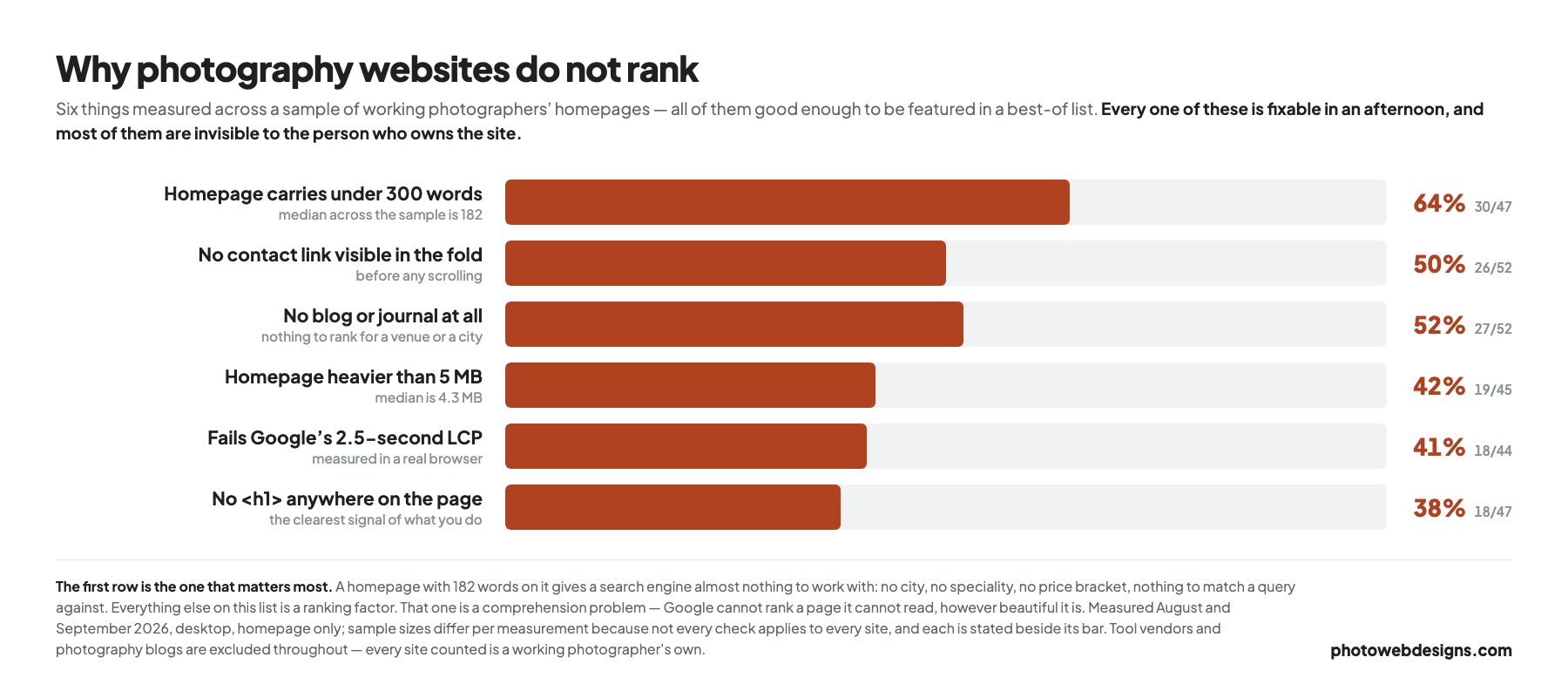
The median photography homepage in our sample carries 182 words. Two thirds carry fewer than 300. That is the whole page, not the visible part.
This is the biggest problem on the list and it is not really a ranking problem, it is a comprehension problem. Google cannot rank a page for “wedding photographer in Bristol” if the page never says it is a wedding photographer or that it is in Bristol. With 182 words there is usually no city, no speciality, no price bracket and no service description — just a name and some photographs.
It happens because minimalism is the established aesthetic in photography, and it is a good one. The mistake is extending it from the design to the words. You can have a spare, elegant page that still tells a search engine what it is looking at.
The fix: get to roughly 400–600 words on the homepage without disturbing the layout. An h1 that names what you shoot and where. A paragraph of genuine introduction. Captions that say who and where. Alt text on the photographs. None of that requires a redesign.
2. There Is No <h1> At All
38% of the homepages we checked — 18 of 47 — have no h1 element anywhere.
The h1 is the single clearest statement a page makes about its own subject. When it is missing, Google falls back to the title tag, the navigation, and the filenames of your images, which is how a site ends up ranking for its own name and nothing else.
The usual cause is a logo image sitting where the heading should be, or a template that styles the site name as a heading and never adds a real one. It is worth checking rather than assuming: right-click your homepage, choose “view page source” and search for <h1. If there is no match, that is a ten-minute fix with a disproportionate payoff.
3. The Photographs Are Not Reachable
Two separate findings here, and both are common.
Median page weight is 4.3 MB, 42% of sites are over 5 MB, and 27% are over 10 MB. Images are the bulk of it — 73% of page weight on the median site. Consequently 41% fail Google’s 2.5-second Largest Contentful Paint threshold when loaded in a real browser — and Core Web Vitals are a ranking signal, on mobile especially.
The second finding is stranger. On a handful of sites the photographs are not in img tags at all — they are CSS background images or video elements. Those carry no alt text and do not appear in image search. We found homepages showing six or more photographs where a crawler would see none. If you have built a gallery this way, none of that work is reaching Google Images.
The fix: resize before you upload, serve AVIF or WebP with a fallback, and keep real img tags for anything you want indexed. We covered the settings in detail in how to speed up a slow photography website, including what each export setting actually costs you in bytes.
4. There Is Nothing To Rank Except The Homepage
52% of the sites we measured have no blog or journal. That means the entire site is competing on a handful of pages, all of them about the photographer rather than about anything a client is searching for.
This is the one piece of standard advice that survives contact with the data, but the standard version of it is wrong. “Blog more” is useless. What works for photographers is narrower: publish complete shoots and name the venue, the city and the supplier. “A November wedding at Elmore Court” is a page that can rank for a venue name, and venue names are exactly what couples search when they have booked the place and now need a photographer.
One caution from the measurements: a blog abandoned after four posts is worse than none, because it dates the whole site. Only start one you will keep.
5. Half Of Them Hide The Way To Get In Touch
50% of the homepages we measured have no contact link visible before you scroll. This is not a ranking factor, and we are including it anyway, because ranking is not the point — enquiries are.
There is no version of this that helps. A visitor who has decided to contact you should not have to look for how. The fix is one link in the header, which every one of these sites already had room for.
What Is Not The Problem
Two things worth saying plainly, because they absorb a lot of attention.
Your platform is not the problem. We grouped page weight by what each site was built on and every group overlapped every other one. The lightest WordPress site in the sample was 0.5 MB and the heaviest was 18.3 MB — a 34-fold spread on identical software. Switching platform will not fix a slow site; changing what you upload will. The full platform comparison is here.
Design trends are not the problem either. Dark mode, parallax scrolling and full-screen video are the three things trend lists push hardest, and they turn up on 19%, 15% and 13% of real photography sites respectively. None of them is holding your rankings back, in either direction.
The Order To Fix Them In
- Check for an
h1. Ten minutes. Nothing else on this list matters if Google cannot tell what the page is about. - Get the homepage to 400–600 words. An afternoon, and it is the single biggest lever here.
- Put a contact link in the header. Ten minutes, and it affects enquiries rather than rankings.
- Resize your exports. A morning, and it fixes page weight and LCP together.
- Start publishing complete shoots with venue and city named. Ongoing, and the compounding one.
The first three take under an hour between them and are where almost all the immediate gain is. If you would rather it were handled, that is what we do — see website design for photographers.
Frequently asked questions
Why is my photography website not showing up on Google?
On the sites we measured the most common cause by far is that there is almost nothing to read: the median homepage carries 182 words and two thirds carry under 300. A search engine cannot match a page to “wedding photographer in Bristol” if the page never says either thing. The second most common cause is a missing h1, absent from 38% of the homepages we checked.
How many words should a photography homepage have?
Aim for roughly 400 to 600. The median in our sample was 182, which is far too little for Google to establish what you shoot or where you work. You can reach 400 without disturbing a minimal design — a real h1, one paragraph of introduction, and captions that name the location.
Does website speed affect photography SEO?
Yes, and 41% of the photography homepages we measured fail Google’s 2.5-second Largest Contentful Paint threshold. Images are 73% of the typical page weight, so resizing exports before upload is almost always the fix — not changing host or platform.
Do photographers need a blog for SEO?
47% of the sites we measured have none. A blog helps, but only in a specific form: complete shoots with the venue, city and suppliers named. Generic photography tips do not work. An abandoned blog is worse than no blog.
Will switching website builder improve my rankings?
Probably not. We grouped page weight by platform and every group overlapped every other one, with a 34-fold spread inside WordPress alone. What you upload matters far more than what you upload it to.